Five pages control a draft. Four are tiles on League Admin; the fifth, Draft Administration, is inside the draft itself.
| Page | Use it to | Works on |
|---|---|---|
| Draft Setup | Turn the draft on and off, set the clock and emails, set each team's draft switches, add or remove rounds, create drafts, roll a draft back | The draft you pick under Select Draft |
| Draft Order Rules | Say how the order is worked out from the standings, then apply it | Rules for the whole league; Apply Order to Current Draft changes the Current / Next Draft |
| Draft Slots | Set the order by hand | The Current / Next Draft only |
| Draft Picks | Fix any single pick: owner, place in the order, fined | The draft you pick under Select Draft |
| Draft Administration | Run the draft day to day: the lottery, skips, picks for absent owners, proxies | The draft you opened |
Current / Next Draft is set on League Info, or at the top of Draft Setup (see below). See League Info: every setting.
For the order to do things in each season, follow Start a new season, end to end, phases 8 to 10.
Draft Setup
Pick the draft under Select Draft at the top. The page opens on the league's Current / Next Draft.
Under Select Draft, the page shows which draft is the Current / Next Draft. When you pick a different regular draft, a Make … the Current / Next Draft button appears: use it after Create Next Draft, so the new draft becomes the one the league is working on. Draft Admins, who can't open League Info, set it here.
If the league has no draft yet, the page shows Create First Draft instead: fill in Draft Year, Rounds and Draft Name and choose Create Draft. Every active team gets a pick in each round.
Draft Settings
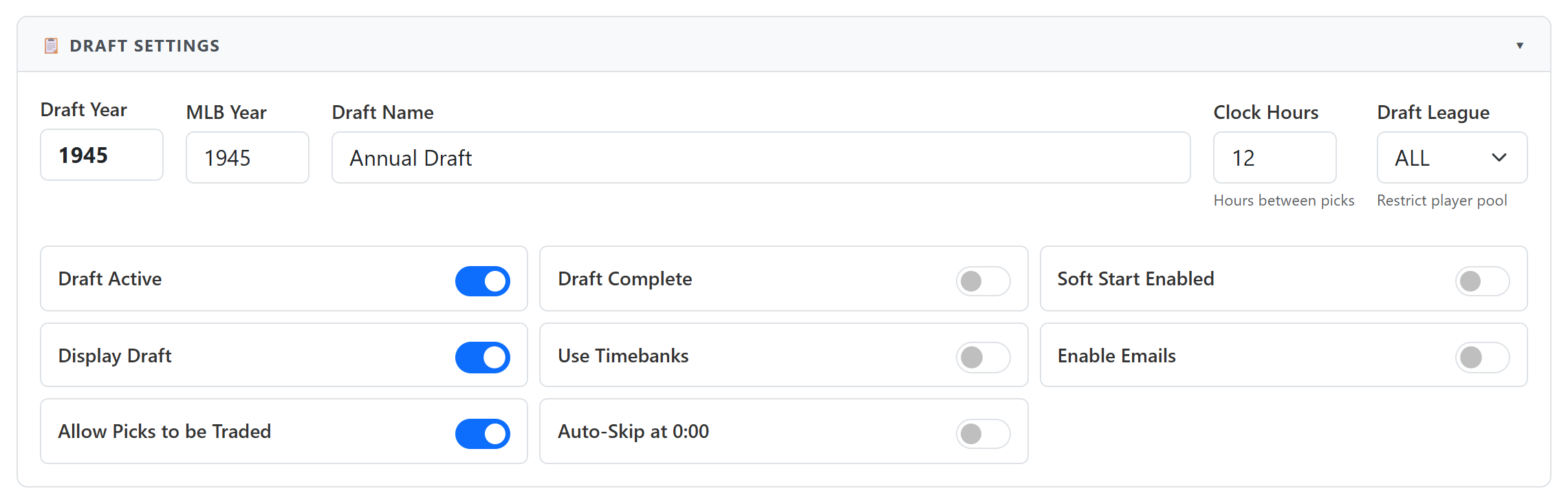
| Setting | What it does |
|---|---|
| Draft Year | The season this draft is for. You cannot change it here. |
| MLB Year | The real-life season whose players and stats make up the draft pool. |
| Draft Name | The name owners see, such as "Annual Draft". |
| Clock Hours | Hours between picks: how long each team has to pick. |
| Draft League | ALL, AL or NL. AL or NL limits the player pool to that league. See Multi-Team Player Pool below. |
| Switch | When it is on |
|---|---|
| Draft Active | The draft is running and the team with the current pick is on the clock. |
| Draft Complete | The draft is over. Add Rounds and Delete Rounds are turned off, and its unused picks can no longer be traded. Tick it when the draft ends. |
| Soft Start Enabled | The draft is open but the clock is not counting: no time comes off any team's time bank and nobody is skipped for running out of time. Owners see a Soft Start badge. Use it to let owners settle in before the timed draft starts. |
| Display Draft | The draft is listed in Draft Central, where owners open it. |
| Use Timebanks | Each team has a time bank (see Timebank below), and time spent on the clock comes off it. |
| Enable Emails | Pick emails, on-the-clock emails and reminders go out. Off: no draft emails, but the draft board still updates live. |
| Allow Picks to be Traded | This draft's picks can be included in trades, as long as the draft is within Tradeable Draft Picks on League Info. |
| Auto-Skip at 0:00 | A team whose time runs out is skipped automatically. |
Choose Save Changes at the bottom of the page to save the switches and the team settings together.
A draft created by Advance to Next Season starts with Display Draft off. Owners will not see it in Draft Central until you switch it on.
Set the draft order before you tick Draft Active. A draft that is active with no order shows "Draft order has not been finalized" and nobody can pick.
Team Draft Settings
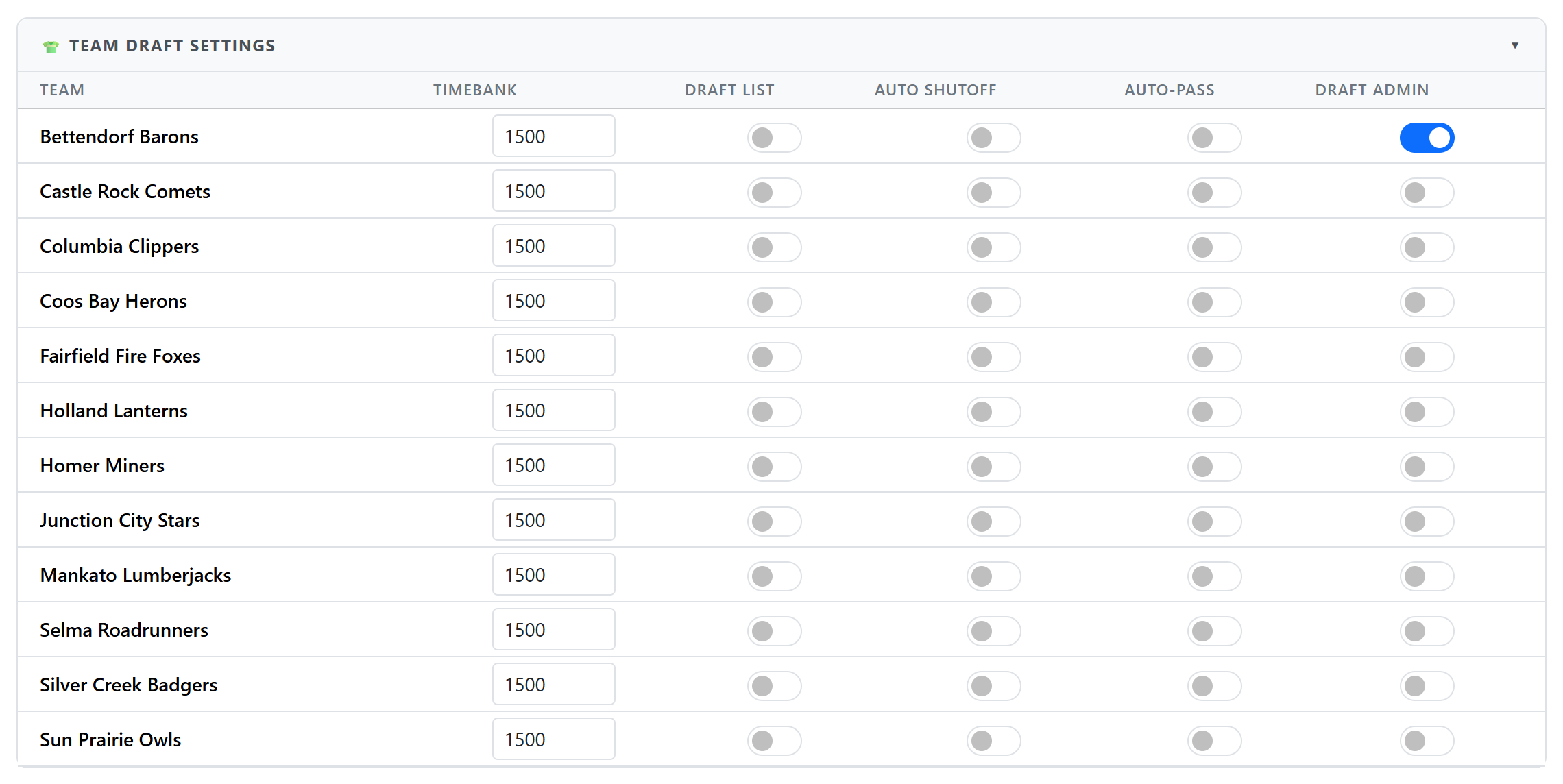
One row per team, for this draft only.
| Column | What it does |
|---|---|
| Timebank | The team's time bank, in minutes. 1500 is 25 hours. Only used when Use Timebanks is on. |
| Draft List | When the team is on the clock, League Toolkit picks for it from the top of its Draft List. |
| Auto Shutoff | Turns the team's Draft List off again after one automatic pick. |
| Auto-Pass | The team passes every pick until this is turned off. It wins over Draft List. |
| Draft Admin | The owner of this team can open Draft Administration for this draft and act as draft admin. This switch covers this one draft only; the Draft Admin role on League Info covers every draft and the draft tiles. |
Owners can set the same three switches for themselves inside the draft, where they are labelled Enable Draft List, Auto-Shutoff and Auto-Pass. See Build your Draft List.
Being commissioner does not open Draft Administration by itself. Switch on Draft Admin for your own team (and for anyone helping you run the draft) in this table, then save. Team Info has no draft admin switch; it only points you here. To give someone draft admin for every draft, plus the draft tiles, make them a Draft Admin on League Info instead.
Draft Operations
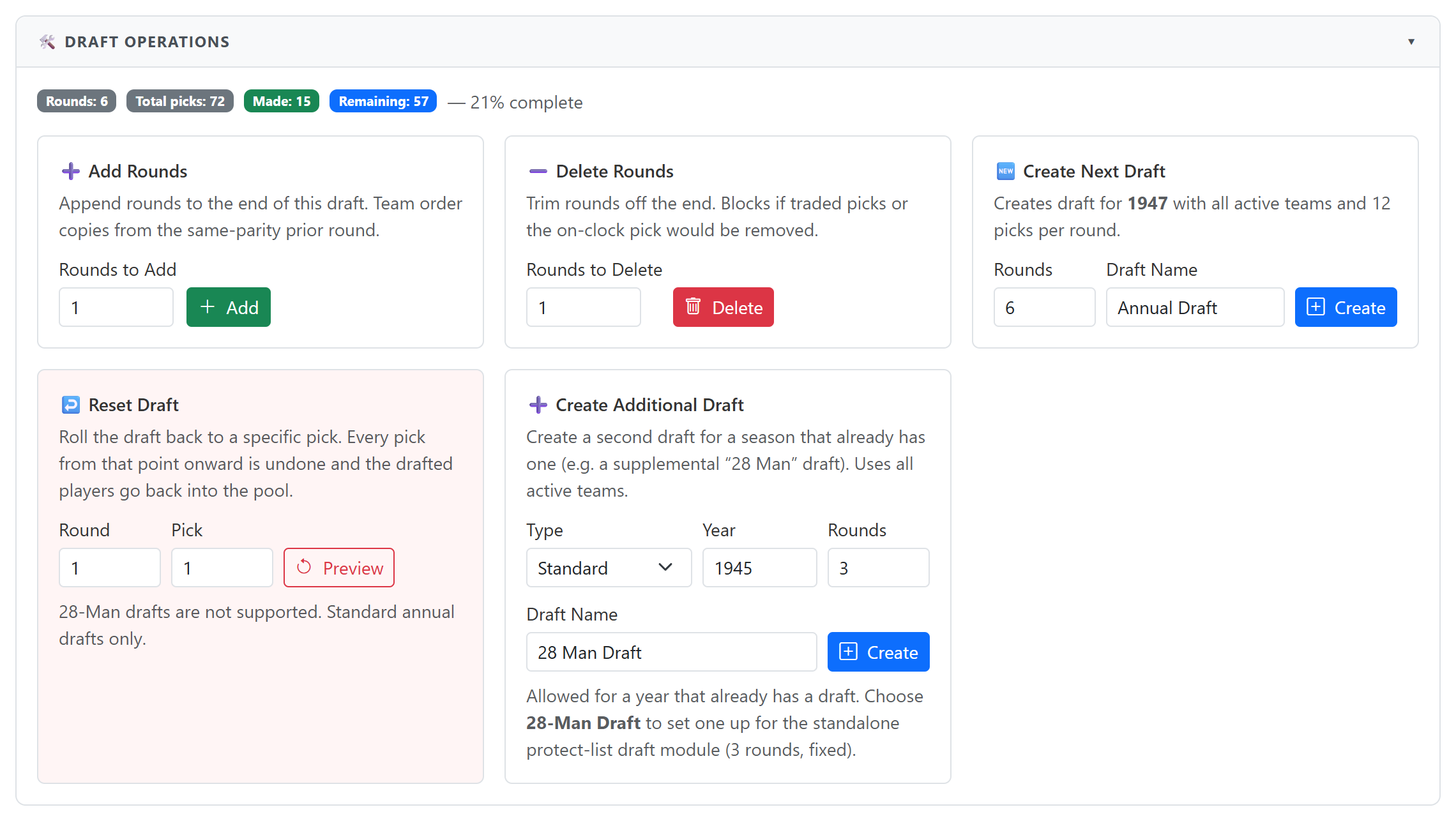
The badges at the top show the draft's size: Rounds, Total picks, Made, Remaining and how complete it is.
| Tool | What it does |
|---|---|
| Add Rounds | Adds rounds to the end of the draft. Each new round copies the team order of the last odd or even round before it. Off once the draft is complete. |
| Delete Rounds | Removes rounds from the end. It refuses if that would remove a traded pick or the pick on the clock. Cannot be undone. Off once the draft is complete. |
| Create Next Draft | Creates the next season's draft, with every active team and the Rounds and Draft Name you give. Off if that draft already exists. A future draft must exist before its picks can be traded. |
| Reset Draft | Rolls the draft back to a pick. Fill in Round and Pick, then choose Preview. A box lists every pick that will be undone. To go ahead, type the round and pick (for example 3.5) and choose Reset Draft. The players go back into the pool, time banks are restored, that pick goes back on the clock, and the league gets an email. Standard drafts only. |
| Create Additional Draft | Creates a second draft for a season that already has one. Type is Standard or Cutdown Draft: a separate protect-list draft, usually held before the annual draft, where each team protects part of its roster and the rest go into a shared pool. Type what your league calls it in Draft Name (for example "28 Man Draft"); that name is what owners see. The next one you create is offered the same name. Uses every active team. |
Reset Draft cannot be undone. Use Preview and read the list before you confirm.
Draft Order Rules
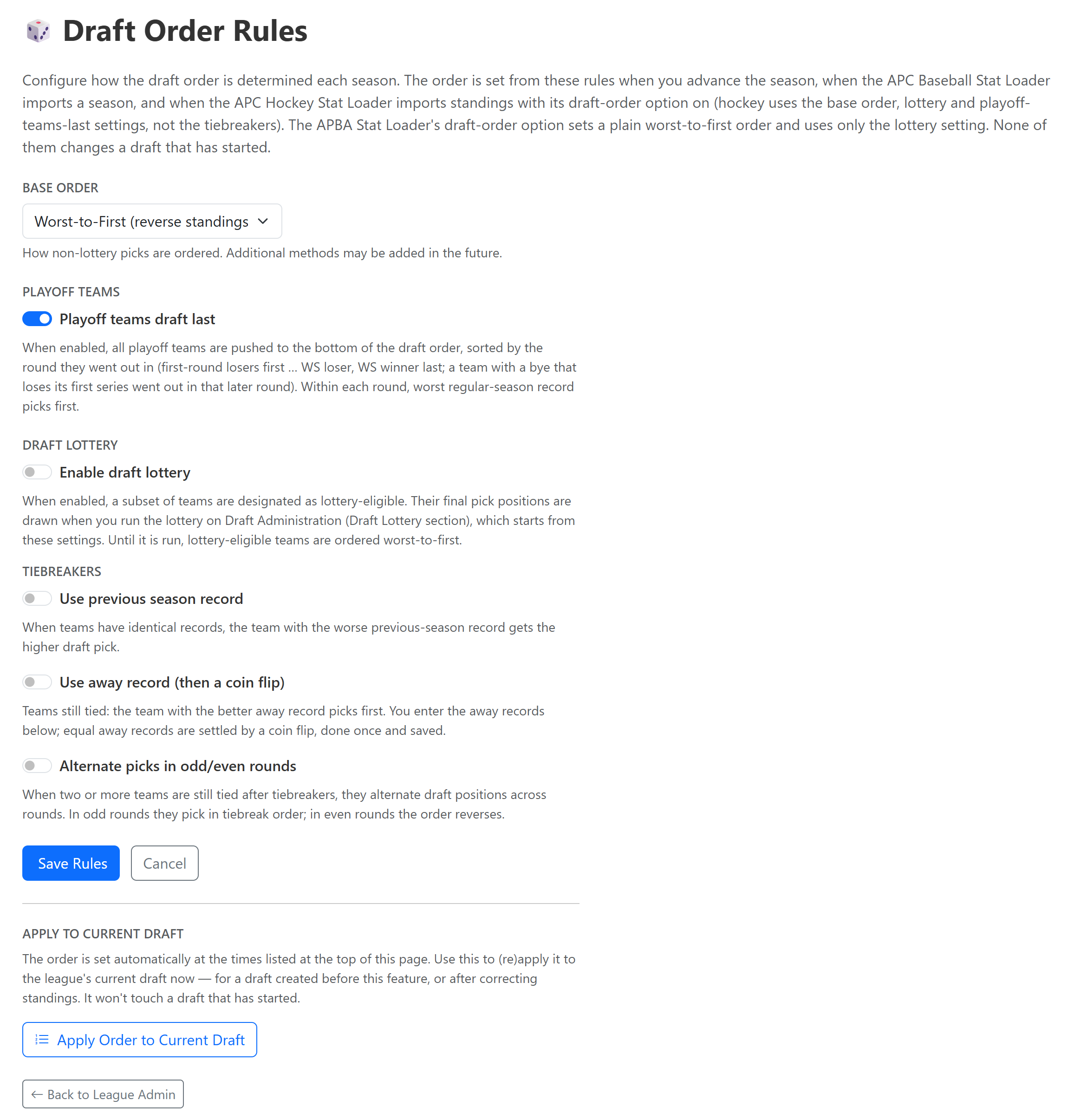
These rules say how League Toolkit works out the draft order from the standings. They belong to the league, not to one draft. Choose Save Rules after changing them.
| Setting | What it does |
|---|---|
| Base Order | Worst-to-First (reverse standings): the team with the worst record picks first. This is the only choice for now. |
| Playoff teams draft last | Every playoff team picks after every non-playoff team. Playoff teams are ordered by the round they went out in: first-round losers first, the champion last. Within a round, the worse regular-season record picks first. |
| Enable draft lottery | Marks some teams as lottery teams. Choose a Lottery Method: Worst X Teams (then fill in Number of Lottery Teams) or All Teams Below .500. Until a lottery is run, lottery teams are simply ordered worst to first. |
| Use previous season record | Teams with the same record: the one with the worse record the season before picks first. |
| Use away record (then a coin flip) | Teams still tied: the better away record picks first. Equal away records are settled by a coin flip, done once and saved. |
| Alternate picks in odd/even rounds | Teams still tied after the tiebreakers swap places every round: tiebreak order in odd rounds, reversed in even rounds. |
When Use away record is on and teams finished with the same record, a Tied records table appears. Type each tied team's Away W and Away L, then choose Save Away Records.
Apply the order
Apply Order to Current Draft sets the order of the Current / Next Draft from the standings of the season before it. A message lists the round 1 order. It does not change a draft that has already started.
The order is also set for you at these times, as the top of the page explains:
| When | What is used |
|---|---|
| You advance the season | These rules |
| The APC Baseball Loader imports a season | These rules |
| The APC Hockey Loader imports standings with its draft-order option on | The base order, the lottery and Playoff teams draft last, but not the tiebreakers |
| The APBA Stat Loader runs with its draft-order option on | A plain worst-to-first order; of these rules it uses only the lottery setting |
None of them changes a draft that has started. Use the button after you change the rules or correct the standings, or to put the full rules on a draft the APBA Stat Loader ordered.
The lottery itself (the draw) is run in the Draft Lottery section of Draft Administration, not here; the page says so under Enable draft lottery. The lottery settings on this page fill in that form for you: Number of Lottery Teams becomes Teams in lottery, and Playoff teams draft last ticks Leave playoff teams out.
Draft Slots
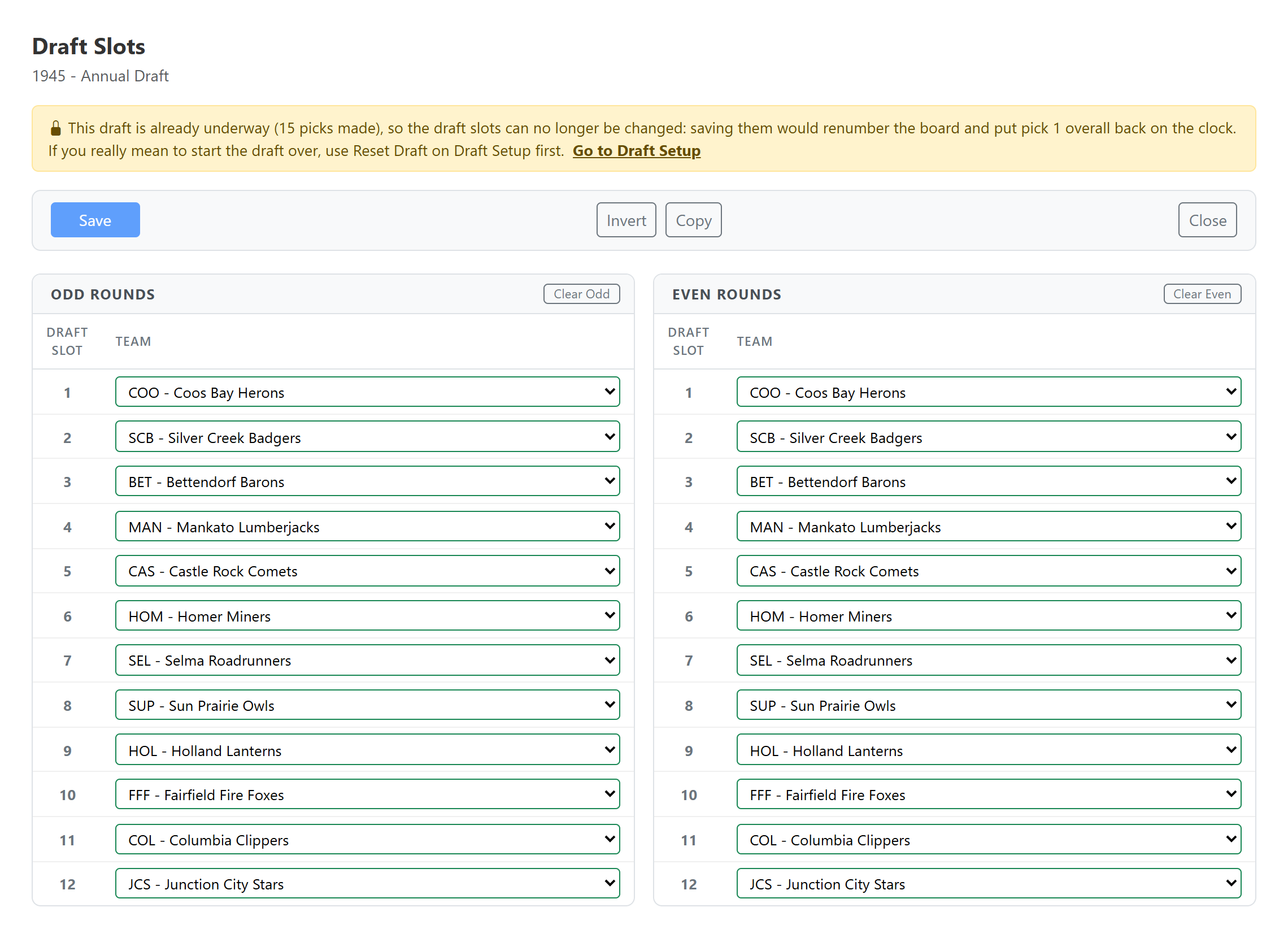
Draft Slots sets the order by hand for the Current / Next Draft. If none is set, the page asks you to set Current / Next Draft first, with a Go to League Info button (Draft Admins get a Set it on Draft Setup button instead).
Draft Slots works only before the draft's first pick. Once any pick, skip or pass is recorded, a yellow notice says the draft is already underway, with how many picks have been made, and Save is greyed out. Changing the slots then would renumber the board and put pick 1 overall back on the clock. If you really mean to start the draft over, choose Go to Draft Setup in the notice and use Reset Draft first.
- Odd Rounds: the team in each slot for rounds 1, 3, 5 and so on.
- Even Rounds: the same for rounds 2, 4, 6.
- Invert: copies the odd-round order into the even rounds, reversed (a snake draft).
- Copy: copies the odd-round order into the even rounds as it is.
- Clear Odd and Clear Even: empty a column.
- Save: saves the order. It will not save while a slot is empty or a team appears twice; those slots are outlined in red.
Each team's own pick takes its slot in every round. A pick that was traded keeps its new owner; it simply moves to the original team's slot. Extra picks added on Draft Administration keep their place. Saving puts pick 1 overall on the clock.
To move a single pick once the draft is underway, change it on Draft Picks instead.
Draft Picks
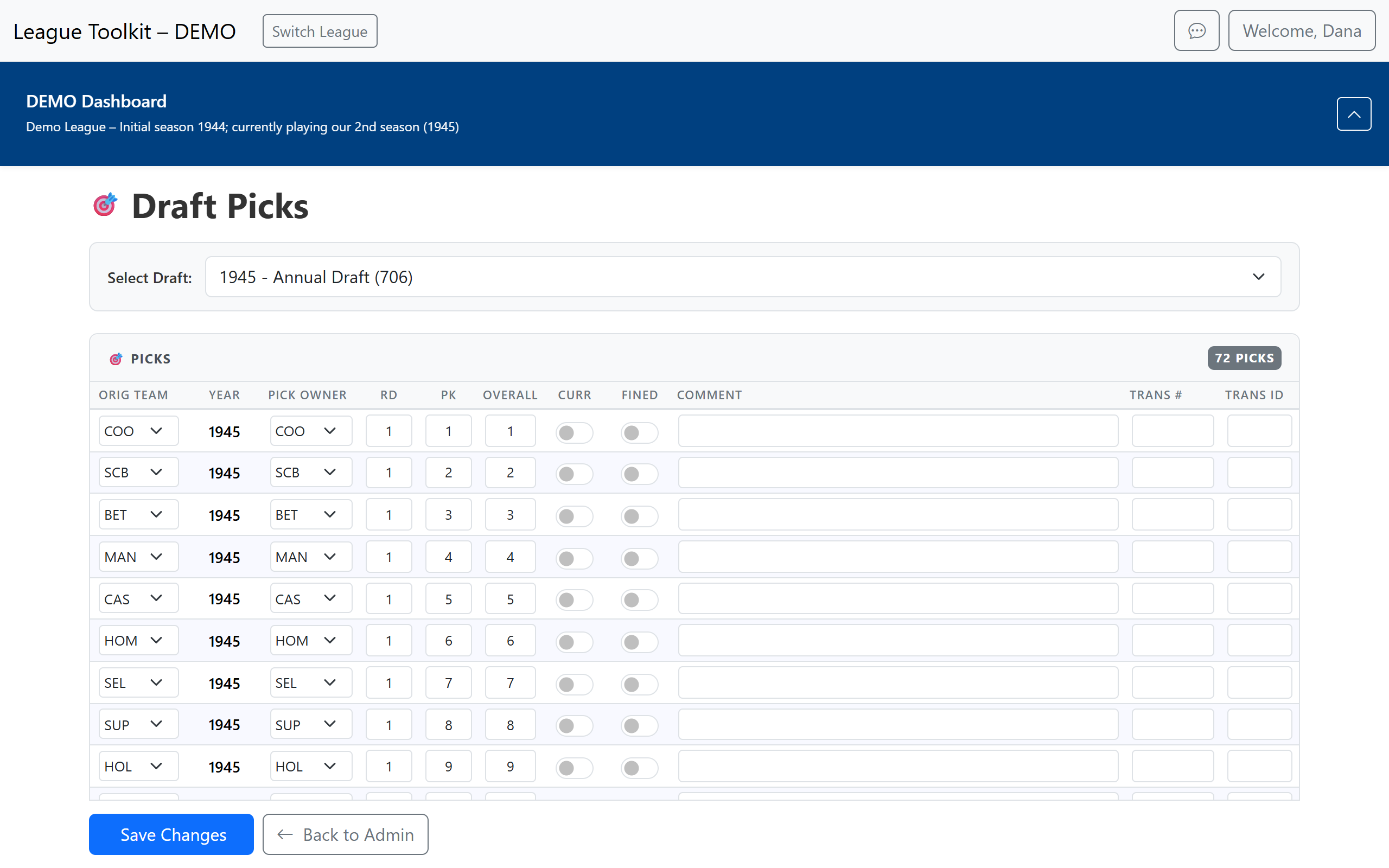
Draft Picks lists every pick in the draft chosen under Select Draft, and lets you correct any of them. Choose Save Changes at the bottom to save the whole table.
| Column | What it is |
|---|---|
| Orig Team | The team the pick originally belonged to. |
| Year | The draft year. |
| Pick Owner | The team that owns the pick now and will make it. Change this to move a pick by hand. |
| Rd, Pk, Overall | The round, the pick within the round, and the pick number across the whole draft. |
| Curr | The pick on the clock. Only one pick can have it. If none has it and no picks have been made, pick 1 overall gets it when you save. |
| Fined | The pick is forfeited. Switching it on writes FINED in Comment. When the draft reaches a fined pick it is recorded as fined and skipped by itself, and a fined pick cannot be traded. |
| Comment | A note shown with the pick. |
| Trans # and Trans Id | Transaction references kept with the pick. Leave them alone unless you are correcting a trade record. |
Draft Administration
Open the draft from Draft Central, then choose Admin in the toolbar at the bottom. Only owners whose team has Draft Admin switched on for this draft (on Draft Setup) can open it.
The page has these parts, top to bottom.
Draft emails are ON / OFF. Shows whether draft emails go out, with one button to turn them off or on. It is the same switch as Enable Emails on Draft Setup.
League File (C-file). APBA baseball leagues that are not APBA GO leagues. After you load the pre-draft league file on the APBA Stat Loader, League Toolkit adds each batch of picks to it. Update now re-reads the web rosters; Download updated file gets the file.
Draft Lottery
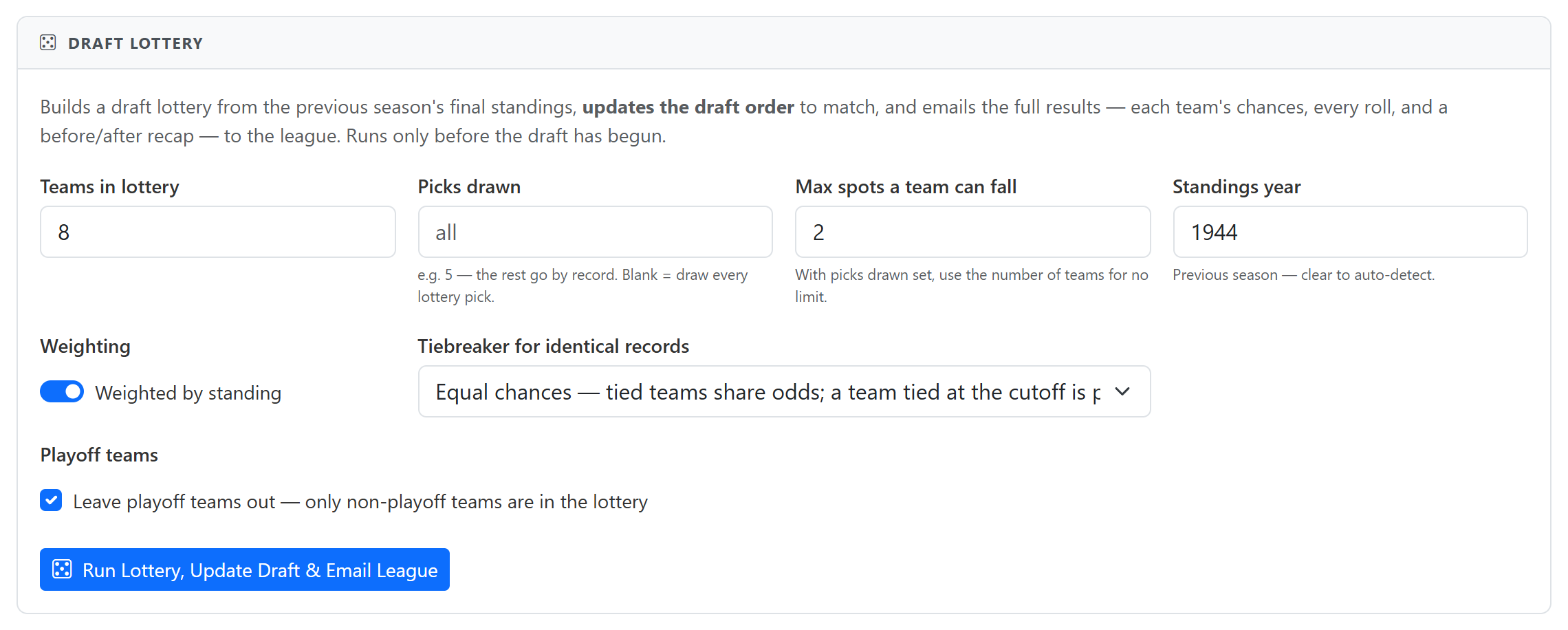
Runs a lottery from the previous season's final standings, changes the draft order to match, and emails the results to the league: each team's chances, every roll, and the order before and after. It only runs before the draft has begun.
| Field | What it does |
|---|---|
| Teams in lottery | How many teams take part. |
| Picks drawn | How many picks are drawn. The rest go by record. Blank: every lottery pick is drawn. |
| Max spots a team can fall | The furthest a team can drop from where its record puts it. |
| Standings year | The season whose standings are used. Clear it to let League Toolkit find the previous season. |
| Weighted by standing | Worse teams get better chances. |
| Tiebreaker for identical records | Equal chances, Prior seasons, or Draft Order Rules (your league's tiebreak). |
| Leave playoff teams out | Only non-playoff teams are in the lottery. |
Run Lottery, Update Draft & Email League changes the draft order for every team and emails the league at once. It cannot be undone. Run it once, before the draft starts.
The rest of the page
| Part | What it does |
|---|---|
| Draft Settings | The same settings as Draft Settings on Draft Setup, with its own Save Draft Settings button. |
| Multi-Team Player Pool | For a draft limited to AL or NL. Players traded between the leagues are left out by default; Manage Player Pool lets you include them. |
| Current Pick Actions | Shows who is on the clock. Make Pick for picks for that team. Skip Pick moves on; the team can make the pick later. Skip Pick (Fined) moves on and forfeits the pick. Email Reminder nudges the owner, at most once a minute. |
| Proxy Access | Choose a team under Manage proxies for, then Grant another owner temporary authority to run that team's draft. |
| Skipped Picks: Available for Update | Every skipped or passed pick. Select Player fills one in. Fined picks are not listed. |
| Extra Picks | Add a pick another team got from a team no longer in the league. Choose the Round, Slot in round, Held by and From team, then Add pick. Set the draft order first. Remove takes out an extra pick that has not been used. |
| Convert Pick to Skipped | Undo one pick that was made: the player comes off the roster and the pick becomes skipped, so it can be made again. |